
10 Tips for a Successful Live Stream of an Amateur Sports Game
In today’s digital world, live streaming sports is no longer reserved for professional leagues. Whether...


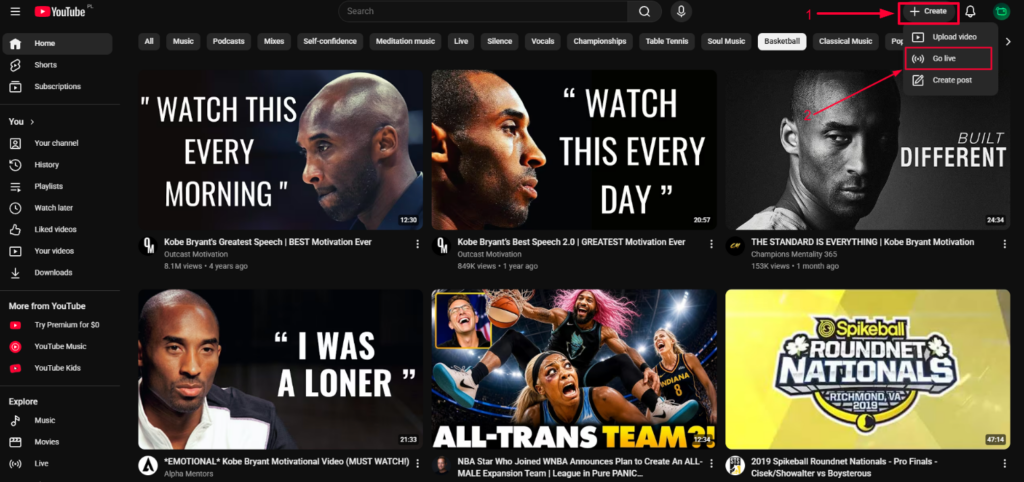
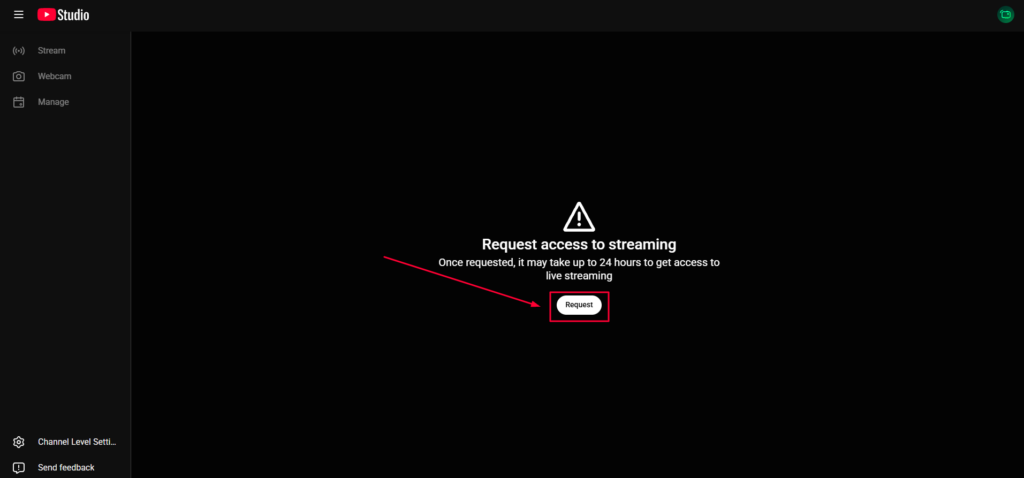
Verify your phone number and wait for activation — it takes 24 hours.
Complete YouTube verification if required.
Once YouTube Live is activated, you can sign in to YouTube in the StreamMySport app and start streaming.

We'd love to hear from you!
Have a question about StreamMySport, need help with the app, or simply want to say hello? We're always happy to hear from you!
Whether you're looking for technical support, have an idea for a new feature, or want to explore a potential partnership, our team is here to help.
We're also excited to connect with sports clubs, tournament organizers, schools, and content creators who want to bring more sporting moments to life through livestreaming.
Get in touch with us at:
We'll do our best to get back to you as soon as possible.
Let's make sports more accessible, together!
Let’s Contact
We’re opening early access for passionate streamers.
Join the waitlist now and get an exclusive launch discount when the app goes live.
No spam — we’ll notify you once the app is live on Google Play & App Store!
StreamMySport
is Launching Soon!